11
11
Are you a MEPCO consumer tired of standing in long lines to pay your electricity bills? With MEPCO Pakistan, you can now check, download, and pay your bills online in just a few clicks. MEPCO offers convenient digital services including MEPCO online bill check, SMS alerts, bill history access, and duplicate bill downloads.
In this guide, I’ll walk you through all the ways to manage your MEPCO bills, understand tariffs, explore payment methods, and even reduce your electricity usage to save money.
Checking your MEPCO online bill has never been easier. You can skip long queues and view your electricity bill instantly from home. MEPCO provides various ways to check your bills, including using a reference number, customer ID, SMS, and browser extensions.
To check your MEPCO bill online using a reference number:
You will see your MEPCO bill details, including the bill amount, due date, and meter readings. You can download or print the bill instantly.
If you are unsure where your reference number is, it is highlighted on your previous bill. This method is perfect for those who want to check the MEPCO online bill Multan or anywhere in the MEPCO region.
If you don’t have your reference number, you can also check your bill using your 10-digit customer ID:
This is a simple and fast way to check MEPCO online bills without the reference number.
MEPCO provides an SMS service for consumers who prefer checking bills without logging in online:
This is extremely convenient if you are on the go or don’t want to access the MEPCO portal repeatedly.
MEPCO browser extensions allow you to quickly check your bill:
This tool makes MEPCO online bill checks very fast and accessible.
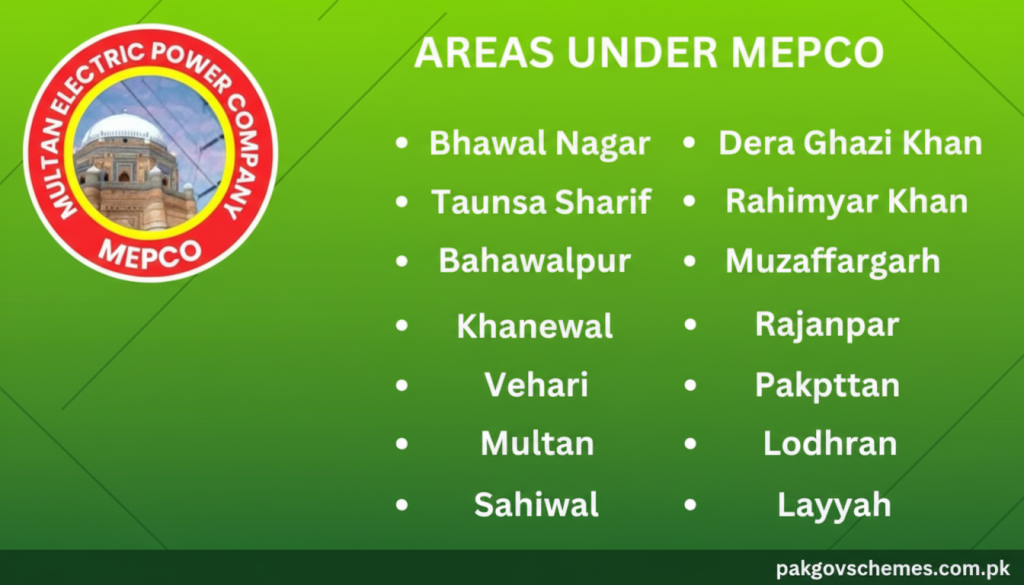
MEPCO (Multan Electric Power Company) was incorporated on May 14, 1998. It distributes electricity across southern Punjab, including Multan, Bahawalpur, Dera Ghazi Khan, Muzaffargarh, Rahimyar Khan, Vehari, Sahiwal, and Bhawal Nagar.
MEPCO serves over 34 million people with 672 feeders, 786 grid stations, and more than 82,000 km of power lines. The electricity is purchased from WAPDA Hydel, Hub Power, and other private IPPs.
MEPCO provides a range of services:
Peak hours are times when electricity demand is high, leading to extra charges per unit. Avoiding electricity use during peak hours can help reduce your bill.
MEPCO allows consumers to calculate their estimated electricity bill using an online bill calculator. Just enter the number of units consumed, and the system will calculate the total bill based on the latest tariff rates.
MEPCO sends an official meter reader to record consumption. You can cross-check these readings for accuracy. MEPCO bills also include:
Understanding these charges helps you know exactly what you’re paying beyond electricity.
Online methods save time and allow bill payment from anywhere:
You can also pay at local bank branches or MEPCO customer service centers. Banks supporting MEPCO bill payments include:
Always pay before the due date to avoid extra charges.
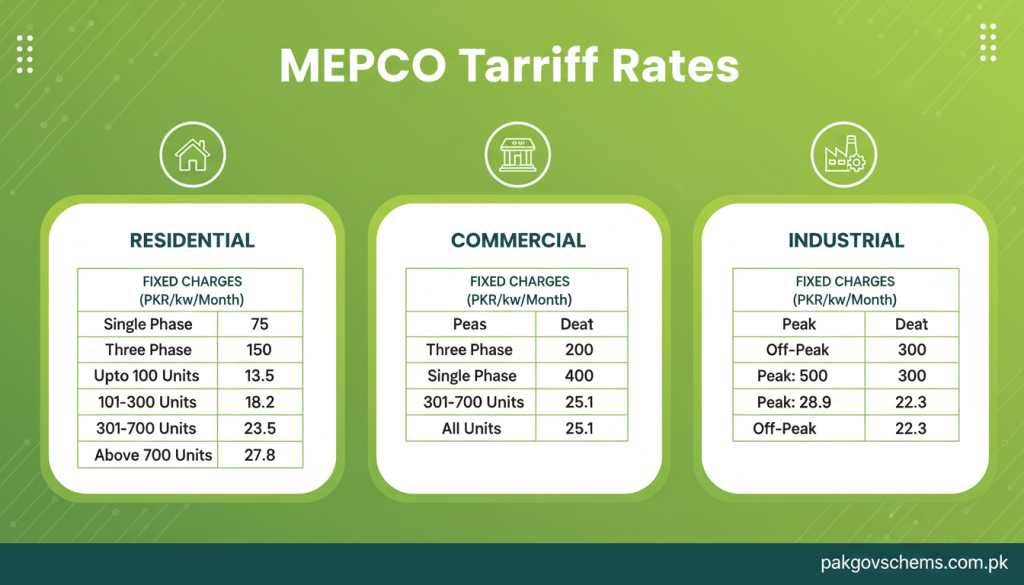
Understanding your MEPCO bill starts with knowing the current tariff rates. Tariffs differ based on the type of connection: residential, commercial, or industrial.
Residential consumers are categorized as domestic protected (0–200 units) and domestic unprotected (above 200 units).
Always check the official MEPCO tariff schedule online for the latest updates and categories applicable to your connection.
MEPCO understands that sometimes electricity bills can be high, especially for industrial or commercial users. That’s why they offer installment plans and due date extensions to avoid disconnections.
Tip: Always request your installment or extension before the bill due date to avoid penalties.
To apply for a new connection:
For billing errors, use the MEPCO bill correction form via the customer care tab online.
MEPCO offers a digital complaint system via CCMS:
Complaint Channels:
Can I check my bill without a reference number?
Yes, using your customer ID via mepcobillchk.pk.
How to resolve incorrect readings?
Register a complaint online or visit your nearest sub-division office.
How to check old bills?
Use the bill history feature on MEPCO’s official site or visit a nearby office.
MEPCO Helpline: 061-9220273
Managing your MEPCO bills has become simple with online services. You can check, download, and pay your bills, understand tariff rates, request installments, extend due dates, and register complaints efficiently. By using MEPCO’s digital services, you save time, avoid queues, and manage your electricity expenses effectively.