

SSGC Online Bill Check – Download Your Duplicate Gas Bill in Seconds
Paying your SSGC bill every month is important, but I know how frustrating it can be when your physical bill doesn’t arrive on time or worse, gets lost. If you’re looking for an SSGC Duplicate Bill online, don’t worry you’ve come to the right place. In this guide, I’ll walk you through how you can check, download, and print your Sui Gas bill in just a few clicks. Whether you’re on your mobile, tablet, laptop, or PC, you can get your bill instantly and completely free.
I’ll also share everything you need to know about the SSGC helpline, customer number, office timings, and alternative ways to check your bill. Stick with me until the end, and you’ll never have to stress over missing your SSGC bill again.
SSGC Bill Checker
SSGC Bill Check Online (Instant Duplicate Bill Download)
To check your SSGC bill online, simply click the Get Bill Now button on our website. Once you enter your 10-digit Customer Number, your SSGC duplicate bill will appear instantly. From there, you can view, download PDF, or print your bill.
No login required
Free & instant
Works on all devices
Step-by-Step Guide to Check SSGC Duplicate Bill Online
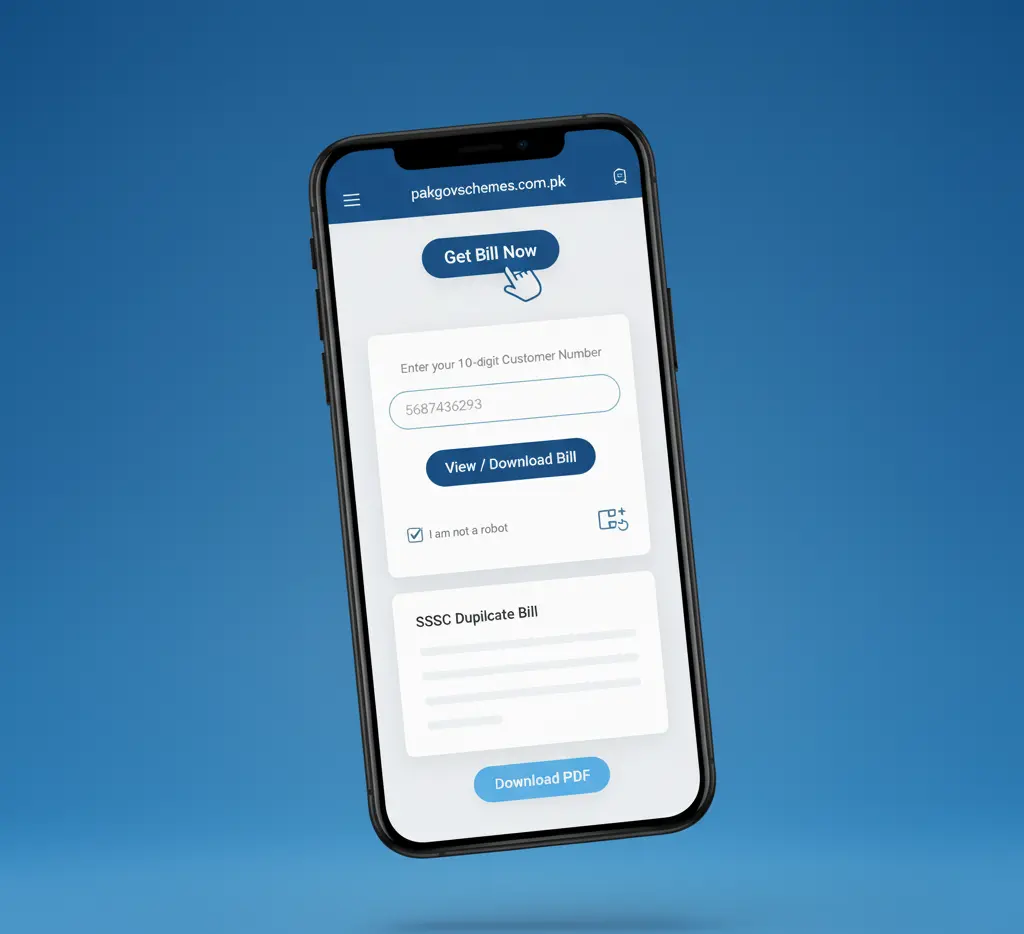
Even though the process is simple, if you’re checking your SSGC online bill for the first time, you may feel confused. That’s why I’m breaking it down into easy steps that anyone can follow.
Step 1 – Click “Get Bill Now”
Go to the top of the page and click the “Get Bill Now” button.
Step 2 – A New Page Will Open
You will be redirected to the official SSGC duplicate bill page.
Step 3 – Enter Your 10-Digit Customer Number
Type your Customer Number in the input field. This number is required to check your bill.
Step 4 – Click “View / Download Bill”
Press the button to load your latest monthly bill.
Step 5 – Verify “I am not a robot”
Complete the captcha for security verification.
Step 6 – Your SSGC Duplicate Bill Will Appear
After a few seconds, your SSGC gas bill will be displayed on the screen.
Step 7 – Click “Download PDF”
Download your bill to your device for printing or record keeping.
How to Find Your SSGC Customer Number?
Your Customer Number is necessary to check your duplicate SSGC bill. You can find it easily on:
Old gas bills
SMS notifications (if enabled)
SSGC mobile app
Calling SSGC helpline
On the bill, the customer number usually appears on the top-left section, under your personal details. It’s a unique ID assigned to every SSGC user.
How to Download SSGC Online Bill?
Downloading your SSGC bill is very simple:
- Enter your customer number.
- Click Check Bill.
- Press Download PDF.
The bill will be saved on your mobile or computer. You can open it anytime, even offline.
How to Print SSGC Duplicate Bill Online?
Once you’ve downloaded the SSGC bill PDF, printing it is easy:
- Open the PDF file.
- Click Print from your device or browser settings.
- Choose your printer.
- Press Print.
No special setup required it’s just like printing any normal document.
SSGC Duplicate Bill on Mobile (App + Browser Methods)
Most people today use their mobile phones to check bills. So here are the top methods for mobile users:
Method 1: SSGC Customer Connect App (Recommended)
Step 1 – Download the SSGC Customer Connect App
Go to Google Play Store and search:
“SSGC Customer Connect”
This is the official app of Sui Southern Gas Company.
Step 2 – Register Your Account
Enter:
Name
Email
CNIC
Customer Number
Password
Verify the code and your account will be created.
Step 3 – Download Your Bill
Go to Download Bill → Click your account → Bill downloads instantly.
App Features
Method 2: Mobile Browser (Chrome, Firefox, Safari, Opera, UC, etc.)
If you don’t want to use the app, you can simply use your mobile browser.
Steps:
- Open Chrome / Firefox / Safari / Opera.
- Search “SSGC duplicate bill online” or directly visit ssgcbill.pk.
- Enter customer number.
- View and download your bill.
This method is fast, easy, and doesn’t require any installation.
Paying Your SSGC Bill Online (Banking Apps + Wallets)
There are many digital ways to pay your gas bill online:
1. Mobile Banking Apps
You can pay the SSGC bill through apps of:
Just open your bank app → Select “Bill Payments” → Enter SSGC Customer Number.
2. Wallet Apps (EasyPaisa & JazzCash)
Both apps allow easy gas bill payments:
3. ATM Machines (Offline Payment Method)
Insert ATM card → Bill Payment → Gas → SSGC → Enter Customer Number → Pay.
SSGC Gas Timing (Daily Schedule)
SSGC supplies gas at specific timings across Sindh & Balochistan:
| Time Slot | Schedule |
| Morning | 06:30 AM – 09:00 AM |
| Afternoon | 12:00 PM – 02:00 PM |
| Night | 07:00 PM – 09:00 PM |
These timings help customers get gas during cooking hours.
SSGC Helpline Number
For any emergency or complaint, you can call:
1199 (SSGC Emergency Helpline)
Available 24/7 for:
Gas leakage
Billing issues
New connection inquiries
Complaint registration
History of Sui Southern Gas Company (SSGC)
Sui Southern Gas Company was founded in the 1950s after natural gas was discovered in Sui, Balochistan.
In 1955, the company began supplying gas to Sindh & Balochistan. Over the years, SSGC expanded its:
- Pipeline network
- Gas transmission system
- Domestic & industrial connections
- Customer services
Today, SSGC is one of Pakistan’s largest natural gas distributors serving millions of households.
Frequently Asked Questions (FAQs)
Q1. How can I apply for a new SSGC connection?
You can apply for a new connection on the official SSGC website or visit the nearest SSGC office.
Q2. Can I pay the SSGC bill online?
Yes, you can pay via
SSGC App
Bank apps
Easypaisa
JazzCash
ATMs
Q3. How can I contact the SSGC helpline?
Dial 1199 for emergencies and billing issues.
Q4. How can I check my SSGC bill online?
Enter your customer number on the official SSGC bill page to view your bill instantly.
Q5. What happens if I miss my due date?
A late payment surcharge will be added, and gas supply may be affected if dues remain unpaid for long.
Conclusion
If you want to get your SSGC Duplicate Bill quickly, this guide covers everything from online checking to downloading, printing, mobile apps, bank payments, and customer support. Whether you’re a new user or checking your bill every month, this guide helps you do it easily and without any confusion.